Tuesday, January 28, 2014

2014 Washington Auto Show - Pt. 1

For my first post in close to a year (I really suck at maintaining this blog, I tell you), I figured I'd do a recap of cars and thoughts I had after leaving the Washington Auto Show. Let's see what I remember


  • I'm really not sure what purpose GM had in keeping this division open. They sell Chevy trucks, just with a better options package. All that and combined with Chevy they still can't outsell the Ford F-150. But Pontiac had to die. I tell you...
  • The Denali line has spread from the Yukon based truck to the Acadia crossover and the Sierra pickup. I will say, the interior, wheels and trademark grill treatments still look good. The prices though? Your regular Sierra 1500 can start around $26k. Your Denali? $50k base? Professional Grade pricing, that's for sure...
  • The Acadia crossover is still soldiering on as well. One of the styling refreshes GM made was to change the rear glass and hatch. Instead of something new, they simply used the parts from the now deceased Saturn Outlook (which was probably the better looking between the Arcadia/Outlook/Enclave/Traverse siblings), making it a sore spot for me, being a Saturn fanboy and all. Biggest problem there: rear seats are crap. They are low and flat and not very comfy. While 99% of the time I'd be in the front, and 98% of that time likely in the driver's seat (which was quite nice), I still couldn't buy a vehicle that made the rear occupants that uncomfortable. Still, that Arcadia Denali did look the business...

  • In all white, the new Corvette Stingray convertible looks like the Mach V. It actually looks better than the coupe, probably because the vents in the rear quarter aren't there (or at least painted body colored; hard to see on the turntable). There's a lot of curves, cuts and slashes, and from some angles it looks like a mashup between a Viper and a Ferrari, but however you cut it, the thing has presence. Just paint those vents the same color GM...
  • The Camaro got a nip and tuck. Front end looks OK. The rectangle lights on the rear though? FAIL. Those look better on a Malibu (which, oddly enough, have the 4 square lights similar to what the Camaro used to have). Good to see Chevy still has the same milquetoast styling team for some things. The interior, awash in cheap feeling plastics, still blows, too (but it's a pony car, so I get it)
  • They did have a Chevy SS on hand. While not quite styled as well as the Impala, it's the only way to get your fill of big, brawny Aussie muscle. As the successor of the dearly departed Pontiac G8, I'm sure it will find it's share of driveways to call home. The dash is funky mix of hard plastic, alacantra-ish material and leather. I'm all for layers and contrast, but that didn't work for me. Still, for a sedan with a LS3 engine from the last gen Vette, the last thing most people will care about is the trim.
  • While I'm sure the Cruze and Malibu are fine cars, they simply lack the design of any of the cars in their respective classes. That never stopped them from selling; rather for many folks that's the entire point: clean, unoffensive (or boring) styling that takes no risks and serves as reliable transportation. The fact that Chevy had to go and tweak the Malibu less than 2 years after it was refreshed shows sometimes you can be TOO inoffensive, with fresher sheetmetal moving off the lots much quicker. They're not quite stripper fleet or straight to Enterprise cars, but not much above them either.

  • The new 200 looks the absolute business. While there's a lot of styling in play (you see some hints of the Sonata in the sides, a very strong Audi vibe in the rear glass and tail lights, stretched Dart at the front), it all works in the metal. With a 9 speed transmission and optional V6 churning out 295 horses, this thing comes from an entirely different planet than the current, sad excuse for a car that the 2014 200 (and it's woeful cousin the Dodge Avenger) is. Assuming they can keep the price right and reliability in check (which never was a super strong suit for the Pentastar) they may finally have something competitive in the mid size sedan market since the early Cirrus/Stratus cars of the 90's. They can't get these cars on the dealer lots soon enough.
  • The 300 still looks like a hood Bentley, though they did tone the grill down and sculpt the body a bit. Still one of the few RWD full size sedans not imported from Germany, for which we shoudl be thankful. And yes, it still has a Hemi.

  • The new Fusion is the business. Yes, they stole the front clip from Aston Martin. But looking like a Rapide isn't the worst thing in the world.While only available in 4 cylinder configuration, as most cars in this segment are (the aforementioned 200 and the VW Passat are the only 2 I can think of that have a V6 as an option these days), you can get the 2.0, 240HP (231 on regular gas, natch), engine in your Fusion, which is a slightly detuned version of the motor that throws the Focus ST pocket rocket around. While the dash and most places your hands touch have nice soft material, other places revert to the Tupperware plastic. And while the interior is more, adventurous than the Malibu, not everyone is going to go for the MyTouch settup that Ford is pushing. The touch screen and flat faced buttons are slow, even for someone who knows and can figure out the tech like me. The MyFord Sync voice commands work very well, though. For many, that's probably the way to go. Though if you do, you've got a crapton of buttons on the dash to deal with. Pick your poison. I think if I were buying one, I'd go for the SE trim with the 2.0 engine and possibly the appearance pack. Leather would be nice, but won't make or break me. And I'd probably skip the MyFord Touch package too, even though I can work with it. We will see later this year when it's time to go car shopping.
  • They had a 2015 Mustang on display, but roped off. It's definitely a looker, and nicer in person than in pics. I'm not sold on the rear deck (maybe it's the sea of black between the tail lights that I'd rather have body colored) but the rest of the car looked like...well... a new Mustang. After 50 years you know what a Mustang has to look like. Much like a 911, you're getting evolution, not revolution. It's not as 'retro' styled as past models have been, but the lineage is strong. And finally, an IRS makes it's way into the mix as stock. Considering how they managed to get the car to handle (especially the Boss 302) with the log of a solid axle in the back, it should be fun to see what kind of performance gains they can get from this. The Camaro outsold the Mustang last year. Things may be different now.
  • Last year I was really high on the Taurus SHO. I wanted to recommend it to my dad as a replacement for his aging 1996 Taurus SHO (which still has one of the nicest motors put in a family sedan. The intake runners were works of art, and prettier than anything this side of an Alfa Romeo). But I got in today and....the love was gone. First off, the Taurus was never packaged that well. For all it's size (and it's a big car on the outside) it doesn't seem like there's that much room inside. The trim, dash, and instruments are also starting to show their age. It's still a big fast car that can haul a ton in the trunk. But with cars like the Fusion occupying the same lot and looking vastly better on the inside (crapton of buttons or not), it becomes a harder sell. Still, it's better than his '96, even if it doesn't have as much character.
  • The Fiesta ST looks like a shrunken Focus ST. Everybody that drove it has given it rave reviews. I couldn't get it for 2 reasons. First, it's too small (though if it were just 'daddy's car' instead of the family car I could see it). Second, the sporty Recaro seats would have to go. While the bolsters do their job in holding you in your seat, either I'm too old, too fat, or a combination of both for that to be viable for more than 45 minutes. At least Ford is getting their act together on their headrests though...
  • The 2015 F-150 was also on display. Biggest news there is the aluminum construction, which should make the truck stronger and lighter, supposedly to the tune of 700 pounds. That's HUGE. Though some companies are already throwing shots (I believe someone at Ram said aluminum is great for beer cans....). The one thing I didn't care for during that presentation was the fact they kept mentioning the aluminum construction is 'the same kind we use for the vehicles for our troops'. I get the whole 'Go America' thing but please, stop using those in the military to sell stuff. Irks me to no end, I tell you. Anyway, even with the growing pains of working with aluminum, I doubt Ford will lose any sales to keep it out of the #1 spot it's held for decades.
  • The Raptor is a big freaking truck. Almost makes you want to find some sand dunes and barrel over them at 90 mph. 

Thursday, May 9, 2013

The Great Computer Build 2013 - HAL 4500 Jr Pt. 3

HAL 4500 Jr. has been up and running for a few months now. For the most part. it's been a pretty glitch free experience. Being able to boot up in 45 seconds (typing the login password included) is fantastic. Programs still pop up almost as soon as I click them, and those that need to load a slew of plugins in minimal time. I used to be able to fix a drink in the time Photoshop took to open. Now, before I can decide what I want off the bar area Photoshop is ready to roll. This is speed I can get used to. Mind you, it's not without quirks. For instance, I ended up redoing the install a few days after I got the basic programs loaded up, as for reasons unknown it would not play nice with my WHS2011 rig. The computer thought I had a pending install or update running that prevented the WHS connector software from doing its thing. Since I hadn't started really putting anything on the SSD yet, it didn't take too long to move the few installers I did download to the old HDD (I pulled the drive from my old computer to manually transfer files and programs to the new rig),  reinstall Win7, get the Connector program running for WHS2011, then loan everything up again. Probably took 2 hours out of my life, but it could have been worse.

There was a LOT of this screen, let me tell you...

Unfortunately, 2 weeks later there was a sense of deja vu all over again, as I ended up doing ANOTHER wipe and full reinstall, as my rig and WHS2011 were not on speaking terms for about 2 weeks or so. I couldn't do a backup to WHS2011, or do a backup through Win7. Restarting the backup services didn't seem to help either. Instead of wasting time tracking down what the problem was, it was simply easier to just start from scratch. Again. Let's see how well this one goes, shall we?

In the time since the last post I've made 3 alterations. First, I have a new monitor. My old setup had 2 17" monitors running on my computer desk (again, parts decommissioned from work). On the one hand, they were perfect for the days I had to work from home, as I could have my Outlook open on one screen and the program I use at my job open on the other, and could drag and drop between the two. I have the same setup at work (a 15" laptop and a 20" HP monitor), and after using 2 screens, it's VERY hard to go back. That said, the monitors I was working with at home were the old 4:3 aspect ratio, and the world as a whole is moving to 16:9(ish). Plus, most video cards have some kind of digital output moreso than analog (DVI, HDMI, Display Port), and both monitors I had were straight VGA, which wouldn't do much with any video card I would get. So, another trip to Microcenter was in order. The original plan was to get 2 monitors, somewhere in the 21"-23" range so I could go with the 1080 resolution. After perusing the aisle, I did find a nice 23" AOC e2343Fk monitor, which happened to be on sale. $130 later, I'm walking out of the Falls Church store (which I will never visit again, for a number of reasons that merit a different post).
See the mount? We'll get back to that...

However, there are a few caveats which I must mention, which ultimately may make a change in the final specification. First, while the monitor was on sale, it only came with a VGA cable. Therefore, whatever savings I made on the monitor itself were eaten up by needing to buy a DVI cable. Eh, not the end of the world. The second problem is the size. The initial plan was to get 2 monitors and run them side by side, either on the desk or on a VESA mount. At 23", I'm stretching the amount of room I actually have to work with on my current desk. On the one hand, the desk, and everything in the basement, is subject to change (the desk will be replaced, and ultimately the basement will be rearranged to my liking, whenever I have the time and funds to do so). So, once all is said and done, 2 23" monitors may work just fine. But right now? Not going to happen given space constraints. Third problem: mounts. At the end of the day, mounting the monitors on a VESA mount of some sort will be the way to go. Unfortunately, the AOC monitor I have has a rather funky mounting setup. Instead of the VESA mounting points being on the frame of the monitor, as is often the case, on the AOC the VESA points are on the bottom of the articulating monitor base (which, once extended for desktop use, is already suspect). This means the monitor will sit higher up on the VESA mount once all is said and done. Depending on where the desk ultimately goes (and what desk I chose) it may not be a big deal. Still, it's one additional variable I didn't think would be an issue, but now it is. At this point, I can't say anything bad about the monitor itself as far as the color and sharpness. However, I also can't say I won't sell the monitor at a loss for 2 different monitors in the end. Time will tell.

The second, and much more important, item to be added to the rig was the GPU. It's common knowledge to anyone building a rig that onboard graphics, at best, suck. While Intel's HD4000 series on board graphics are worlds better than what they previously had available, for any moderate gaming it would fall woefully lacking. For casual gaming, it probably would be OK. But to play anything that resembles games on my PS3, the video card was a must, not an option. The catch for me was figuring out the card that would give me the best bang for the buck, which I naturally made more difficult than it needed to be. As mentioned in an earlier post, I have a genetic disease that forces me to check, double check, triple check, and basically drag out any purchase I make. The amount of time it takes to make a decision on a purchase increases depending on the amount and technical nature of said purchase. So with the target price of $200-$250 and a slew of video cards in that range, I was in for a world of pain.

After some internal debate with my wallet, I decided a 7900 series card or a 660 Ti would be more money than I wanted to spend on a card, and quite probably overkill on a 23" monitor. This meant looking at something in either a GTX 660 card (Nvidia) of some ilk or a HD 7870 (AMD). After research and suggestions, I had narrowed the choices down to an EVGA GTX 660 (either SC or FTW) and the XFX 'Double D' HD 7870. For the most part, it seems chosing between AMD and Nividia is a lot like siding with Ford or Chevy, with either make coming out on top depending on the given application (and what goes on sale when). Both cards were spec'd pretty closely, with frame rates not too far off each other, depending on the game. Both also had cool looking fan shrouds, although with the way the mobo sits in any case it really doesn't matter as I wouldn't be able to see it anyway. Vanity, I tell you.... In any case, just before I got to the point of pulling out a coin and flipping it, a la Two-Face, something new hit the scene...

Life would be easier if this was how most decisions were made...

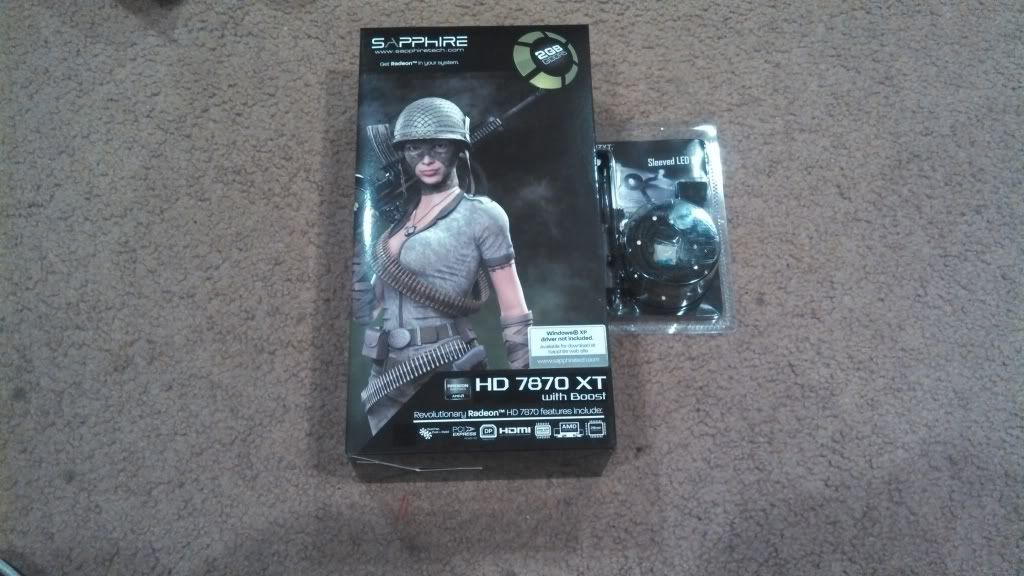
AMD released the HD 7870 LE (or XT, depending on  the card), which was based on a cut down Tahiti chip found in the 7900 series card, rather than a revision of the Pitcairn chip found in the 7800 series. This meant the chip was a bit faster (though possibly less energy efficient) than a stock 7870 chip. Initial testing showed that, depending on the overclock, it would meet or beat some 7950 boards. The best part? The board was close to the same price as your popular 7870  boards, depending on the vendor and what sale they had going. Sounded like a winner to me. The bad news? AMD really didn't push the chip, so only a handful of companies made a board with the new chip. With a little digging, I found out that Sapphire had produced a HD 7870XT with the Tahiti based chip for $245 on Amazon (through Tiger Direct, which is important later...).  Once the funds were right, I picked that up, along with some LED sleeving for the case (figured I may as well, since the case already had a window)

Army boobs sell video cards? If they say so...

So, one Saturday afternoon, I took HAL back to the bench. I cleaned up the internal wiring a bit more, rerouted some of my headers, sleeved my SATA cables, installed the 7870XT, then ran the 2 meters of LED sleeving through the case. Most annoying part? The little clips for the LED sleeve. Their double sided tape sucks. Halfway through the process I had half a mind to grab some servo tape to hold those little clips down. But patience prevailed, and after an hour or two, HAL 4500 Jr. was finally complete


Wednesday, January 23, 2013

The Great Computer Build 2013 - HAL 4500 Jr Pt. 2

The process of choosing parts parts for the build began months ago. There were a few components I knew for sure I wanted that were pretty simple to decide on. A few other pieces, not so much. Come to think of it I'm still deciding on a video card! But I'm getting ahead of myself. Here's what I got and why.

Case: Fractal Designs Define R4

Looks like a mini Monolith. But Titanium Gray...


One of the prerequisites of the build was above all else the computer be as quiet as possible without overheating. Naturally a case with sound dampening material would be in the running. The R4 got the nod for a few reasons. First was the sound dampening materials built inside the case. With padding on the side panels, the front door and the top of the case, it cuts down on noise and vibrations from the inside. Second: fan options. There are 6 places to add fans, either of the 120mm or 140mm design, so there are plenty of places to add cooling. With that many cooling options, the fans wouldn't need to spin nearly as fast, thereby making less noise. Third: design. I've always been a fan of clean lines, symmetrical design, and general lack of gaudiness (I'm a huge Audi styling fan, for instance). Having a door to hide the drives and card reader, which blends into the clean side panels just works for me. Before I was serious about the build I was a fan of the old NZXT H2. After some research, I found that Fractal Designs had worked out a few kinks the H2 had with their R3. By time I started buying parts, the R3 was supplanted by the R4, which was available  with a side window. Now, admittedly, a side window wasn't completely necessary, as the case would be on the floor under the computer table, where nobody can really see it. But a little bit of flash never hurt anybody,  and I wanted a side window. It just says CUSTOM, even if nobody cares. So a trip to Microcenter netted one of these. As an aside, I had been debating on the Ti Gray version or the Pearl Black version (only the color of the front door is different; the rest of the case is black). When I went to the store I couldn't get anybody to grab the ladder and get the case for me (always hovering around when I don't need help, never around when I do. Like the cops...), so I jumped up, knocked it off the shelf and caught it. I swore I had the black, but when I got home it was the gray. In the end, I'm happy with that choice.

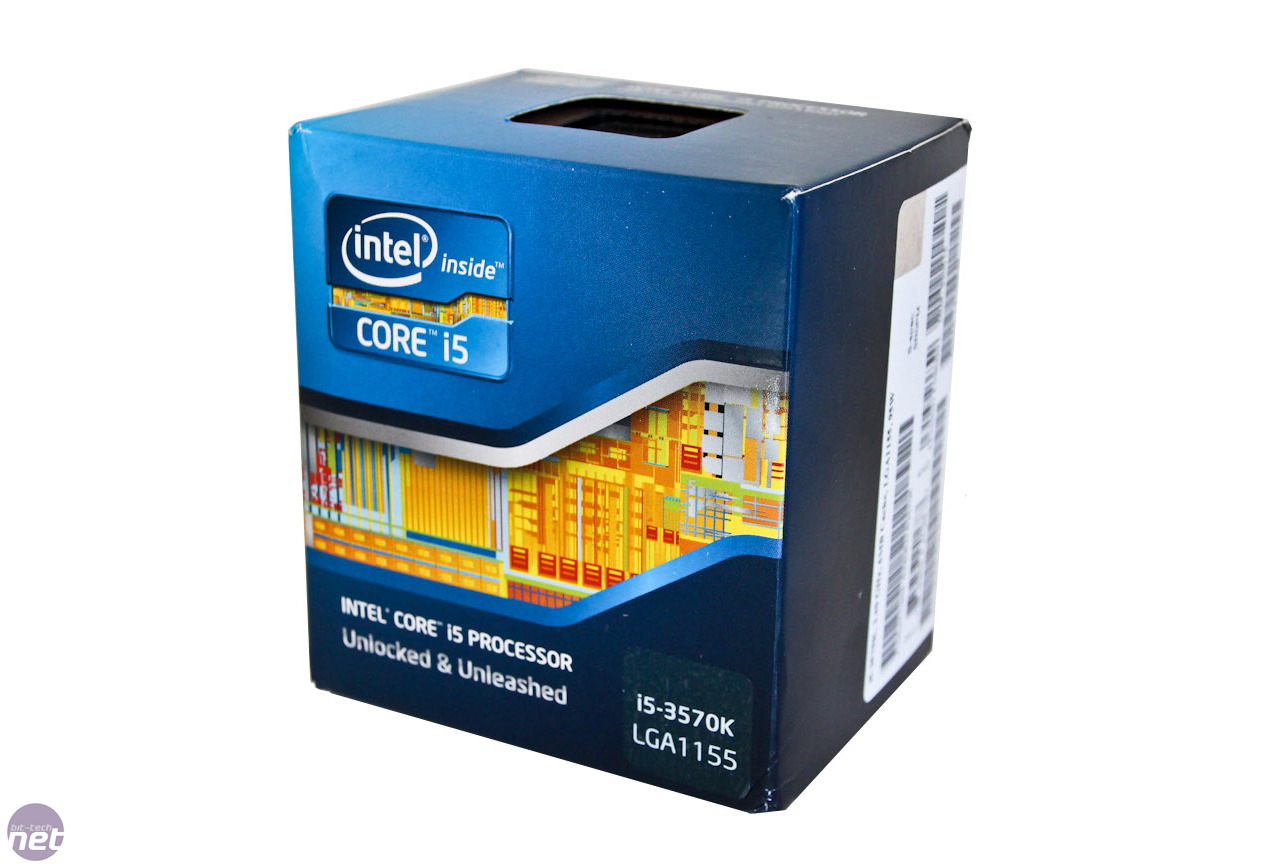
CPU: Intel Core i5 3570K
As with most electronics, there's always a 'sweet spot', a product that will give you the most bang for your buck. Not overpowered for your current or eventual needs (and likewise priced out of your budget), not underpowered now or later (and not bought to meat a lower price point). The i5 2500K was the Goldilocks pick of the Sandy Bridge chips: Faster than an i3, and could be overclocked to match some of the lower i7 numbers, at a price accessible to most builder's budgets. However, by the time I was ready to start buying parts, Ivy Bridge was rolling out en mass. So, it seemed right to pick up it's successor, the i5 3570K. I wouldn't need the hyper threading of the i7 3770, and if I wanted to overclock it I could get faster in most benchmarks than that chip, at a lower cost. Now, realistically, I didn't need the unlocked chip, as my current plans and needs don't warrant any overclocking. Honestly I probably could have been just fine with an i3 chip. But, if you're going to go through the trouble of building your own computer there's no need to gimp yourself from the jump. So the 3570K was a lock

Mobo: AsRock Z77 Extreme4

Unlike most of the choices I had to make, choosing a motherboard seemed like closing my eyes and throwing a dart at a list of names. Admittedly it's hard to get a crappy mobo these days; it pretty much comes down to featureset and UEFI/BIOS preference. None of which I really cared much about, to be honest. As long as I had enough SATA headers for any drives I want to add, as I didn't feel like getting a PCI adapter to add drives (as I did with the old computer), was able to accept 32GB of memory if I decided to go that route down the road, I was fine. Having an onboard wifi card would have been nice, but I'm running Gigabit LAN in the basement, so it was unnecessary at the time (and an add on card if needed down the road would be cheaper). So, it was up to Tom's Hardware for approval. I decided on the AsRock based on 3 things: the recommendation from the website, the fact that Microcenter had them in stock (and would knock $40 off the price if bought with the i5), and that the board was all black, which would match the aesthetic of the R4, with the black/white insides. Hey, if you're going to go custom, there has to be some vanity considerations after all...

PSU: SeaSonic X Series X650 Gold


Choosing a PSU was a headache. I knew I wanted one as quiet as possible. I knew I wanted one fully modular, if possible. I knew I didn't want to spend $200 in the PSU, which was more important than the first 2 demands, as realistically, I was never going to drive the computer to the point that I absolutely needed a $200+ PSU. So the research dragged on. For a while, the thought of a fanless PSU appealed to me, even with their higher price. However, the configuration of the R4 prevented that, as having the PSU mounted on the top of the case generally works better from a cooling perspective with a fanless GPU. So, that was out. Most of the boards, threads, and recommendations from builders gave SeaSonic and their line of PSUs high marks for silence and reliability. The problem was, those PSUs were expensive for a non-modular version. Fortunately, I kept my eye on them. Just before the new year, Newegg had this PSU on sale for $90, which was basically half price, with free shipping. It took 2 weeks to get sent to the house, but a deal like that just could not be passed up, even if I had to wait a month.

RAM: Crucial Ballistix Sport 16GB DDR3-1600

Memory was something I figured, after some internal debate, that I didn't necessarily have to go ALL OUT on. As long as the memory was made by a reputable manufacturer and it  fast enough I didn't really need heat spreaders or super fast timing to support any voltage overclocks (which I'm pretty sure would be a bridge too far for me. At least at this point). That said, I've always heard the mantra 'there's no such thing as too much memory', so at least 8GB would be going in the rig. Brand and exactly how much would depend on what was on sale when I went to the store to pick it up. Originally I was going to go with the Corsair Dominator series. Why? The heat spreaders looked cool. But the Crucial memory was $20 less, which money could be shifted to another part in the build. So, 16GB of Crucial 8x2 memory for $72? Sold. Will I ever NEED 16GB? Maybe not. But I can upgrade to 32GB to max out the board if I so choose too. One thing is for sure. I should never, EVER get a low memory warning, no matter what I have running.

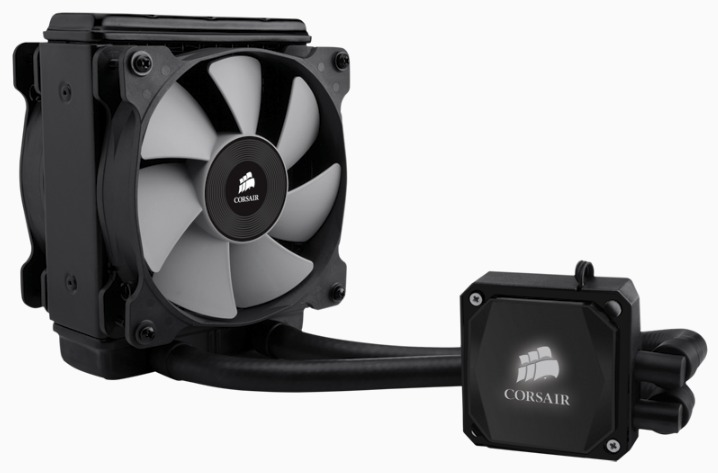
CPU Cooler - Corsair H80i
This decision probably took longer than anything else. Depending on who you ask, the Cooler Master Hyper 212 Evo is all the cooler you need. It easily outperforms coolers 3 times it's price. But I didn't want it. It's too....plain. I could have gone something huge like the Noctua NH-D14. But that's a lot of weight hanging off the mobo I didn't necessarily want. So after a month of research and internal debate, I decided going with an AIO water cooled setup. Would it be as efficient as a home built water cooling loop? Nope. But I wasn't even about to invest the time and resources to map one of those out (especially when all I really need was that 212 Evo). Would the AOI setup be overkill? Yep, as there's not much need to overclock anything and what I currently do won't stress the processor out at all. But again, this was first my custom rig, and a water cooled solution would (in theory at least) be quieter than 2 or 3 huge fans blowing inside the case, hanging over the RAM and making installation a PITA. After another few weeks of research. the H80i won out. Between the ease of installation, the cooling efficiency, control of the Corsair Link2 and the ability to change the color of the LED on the pump (vanity has to be taken into consideration, you know...) it seemed to be the choice for me. When the local Microcenter had it in stock, I snagged it.

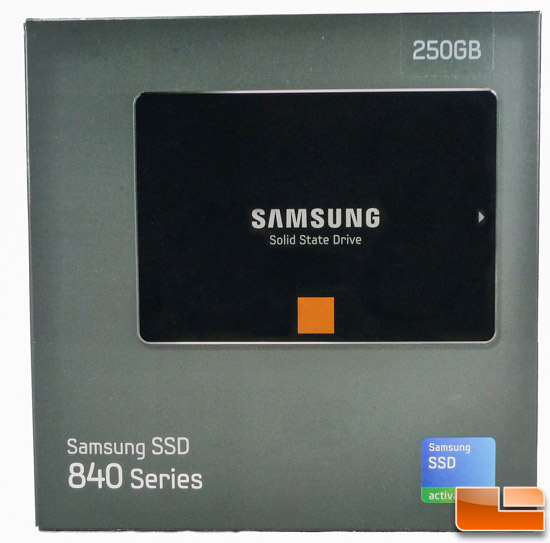
SSD: Samsung 840 Series, 250 GB
Going into the build, I knew I wanted a SSD for the boot drive. Mostly for speed, partially for vanity's sake. The beautiful thing about a SSD: read/write speeds that simply crush a regular HDD. To be able to go from a cold start to working in 20 seconds or less is fantastic. Programs pop open no sooner than you double click them. The biggest problem with a SSD is storage size and cost. Even with the HDD shortage last year (which is starting to stabilize now) you can get waaaaaaaay more storage for less with a standard HDD than going SSD. Which is why most people, yours truly included, will use the SSD as the  boot drive and supplement that with a bigger HDD for data and programs.It's hard to go absolutely wrong with whatever SSD you chose. Yes, some are faster than others, but the majority of the public really won't notice or care, especially if it's faster than they are used to. That being said, if you're going through the trouble of building your own computer, this is the kind of thing that would matter to you, whether you can ACTUALLY tell the difference or not. Samsung's 830 line of SSDs have been regularly praised in reviews for it's speed, so it seemed to be as good a choice as any. Just before I began to open my wallet to start buying stuff, the 840 was launched. So, 840 it was. The biggest question, however, was just how big a drive to get. While a 60GB drive would be more than enough to install Win7 on, anything else would fill the drive faster than it could boot. While you could install most programs on the HDD, some of them don't like to be anywhere but the C: drive. That wasn't worth the hassle for me. So the debate was between the 120GB, which hovered between $100-$120 depending on the store and the week, or the 240+ range, which went for $170-$190, again depending on the time of day and store. In the end I decided to save and go with the bigger drive. May as well have the ability to install whatever program to the SSD and not have to worry about it (considering I had a 320GB drive in the old setup with programs AND data and wasn't quite 3/4 full, the 250GB should be no problem, with a bit better data management). 

HDD: Segate Barracuda 2TB
Not really much to say here. 2TB of storage (7200RPM speeds, to boot) for under $100? Especially when 750GB, and some 500GB drives were as much a few months ago (and even now, if you want, say, a Caviar Black)? Even if most of my data is offloaded to the WHS2011 server, this much internal storage on the rig for this price? Winner, winner, chicken dinner.

ODD: LG 14x Blu-Ray Burner
Remember I said I swapped out the Corsair memory for the Crucial? That had a lot to do with this purchase. For the most part, any DVD burner will do for 98% of people. I mean, unless you're Mr. Bootleg, you're not burning that many movies at home to trade or sell. Most data is being downloaded from somewhere (either legit or grey market), meaning the few times you really need a physical drive would be to install some piece of hardware or to rip a CD you already own to iTunes (or MediaMonkey if you're smart). Likely you have a Blu-Ray player hooked to your TV or own a PS3 to watch your movies. So there isn't that much need for the majority of the public to install a Blu-Ray player in their desktop, other than because you CAN put a Blu-Ray player in your rig. Which was exactly the decision I had to make. In the end, I decided to get at least a Blu-Ray reader, just in case I wanted to archive the movies I have to my server. Looking at the prices on Microcenter, their Blu-Ray readers were somewhere in the $55 range. The Blu-Ray burners? Closer to $75. Not enough difference to kill my wallet. Plus, with the $25+ I saved switching from Dominator memory to Ballistix, well.... there you go.

So, after months of research, planning, saving, and buying (most of which came after the job's winter bonus), I had what I needed to replace the wind tunnel of a computer I was currently using:

Like Christmas for geeks

Since I had a number of crisis to deal with at the time, it would have been smart to wait until the weekend to get everything done. Unfortunately, I'm not that smart, which lead to staying up after 2:30 am two consecutive nights to get everything installed, and a third day to go in and clean up the wiring front and back. But in the end, it all came together


I now have a powerful, cool, quiet, color coordinated computer that should easily be able to handle whatever I throw at it now or months down the road. While the LGA1155 chipset may be supplanted by whatever Intel comes out with this year. my current setup should be able to last me for quite a while before I absolutely NEED to replace anything for being wither too slow or totally obsolete. My inner geek is thrilled.

You may notice that there is no mention of a GPU. Any self respecting builder would die before sticking solely with onboard graphics (even if the HD400 GPU on the 3570K is an improvement on past onboard graphics setups). The reason? I haven't chosen one yet. My OCD won't let me pick between a GTX 660, HD 7870, or the  recently released HD7870 LE (which should be faster than both, and probably faster than a GTX 660 Ti). Realistically, I could but a GTX 650 or a HD 7700 series card and be absolutely fine for what PC gaming I do (currently none), but that would seem to be a disservice to the rig I've built. Plus I still have to decide on what monitors I'm going with (after having a dual monitor setup at work, it's hard to go back to a single, even at home). Both, and whatever other peripheral I need to pick up, will be covered in a later blog.

In the end I managed to build a cross between the Baseline and Performance recommended setup from  MaximumPC, but slightly cheaper. I can't hear the computer upstairs, it boots up faster than I can fix a drink while waiting, it looks great, and I shouldn't have to replace anything for a few years unless I absolutely need the newest and best, which I don't. I haven't come up with an official name, so Hal Jr. it is for now. It's not sentient (nor will it be), nor the most powerful or best spec'd rig around. But it was designed and built from the ground up by me, so it's perfect for me. It's the sweet spot.

Maybe I should call it Goldilocks....

Monday, January 21, 2013

The Great Computer Build 2013 - HAL 4500 Jr Pt. 1

I am a geek. A geek with a bit of an OCD complex. And I am OK with that. That's the only way I can explain most of the things that interest me and how I approach them. Take my RC hobby for instance. The majority of people go with whatever Tyco product is shown on TV, or whatever is on sale at Radio Shack.

I'm sure somebody got this for Christmas. Not sure why though...

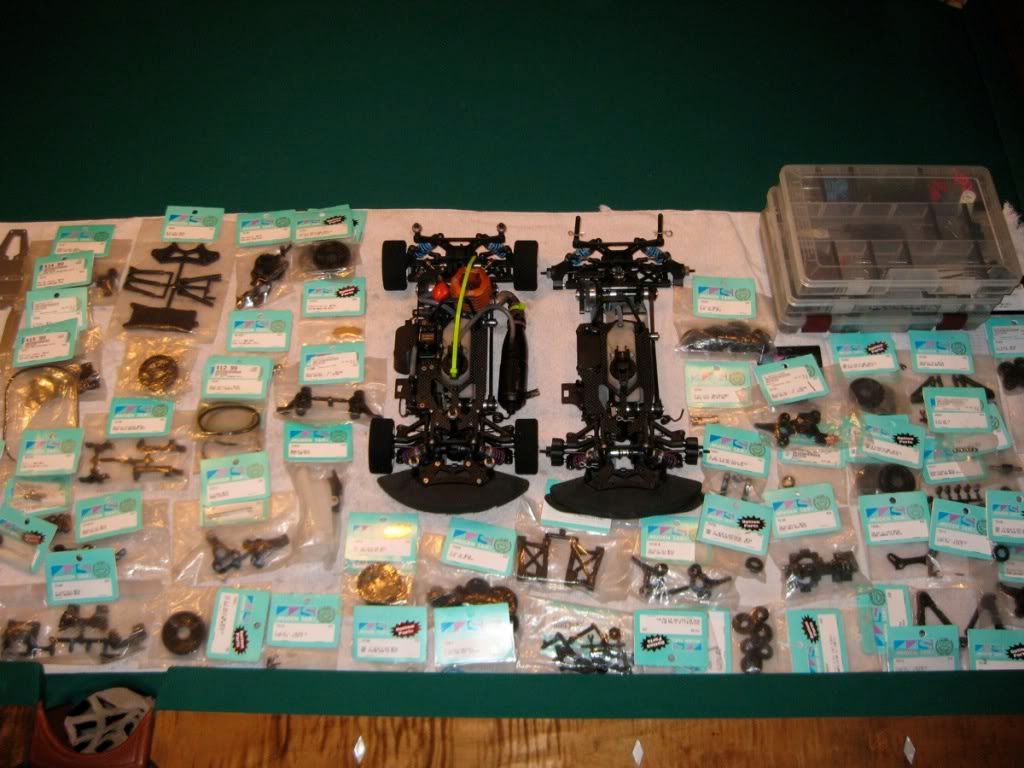
 Me? I've got maybe 8 vehicles, all of which were built from kits, which had to be ordered online or purchased from a hobby shop (and I have been to most of the shops and know some of the workers of said shops in a 50 mile radius of the house), and can tell you what rechargeable battery (moving to lipos), motor, engine (there is a difference), speed controller, servo, body, starter box, radio....

I can probably name each of those parts. Probably own most of them too,,,

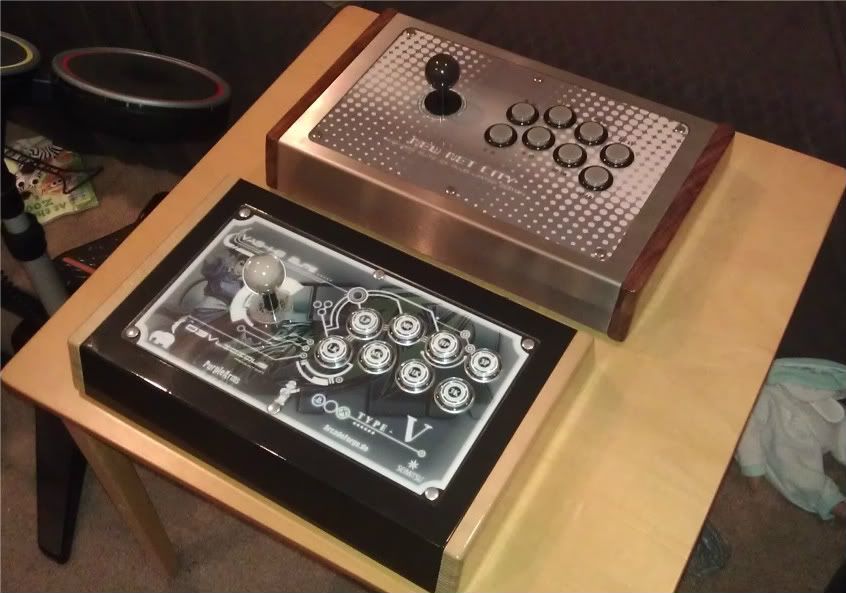
You get my point. Video games. I've played SFII and it's ilk since the arcade scene was hot in the 90's. Most people would just play on their control pad, or, at best, but a controller from Madcatz or Hori (the fact I know the brands already gives the geek aura away). But how many people do you know have gone and built their own arcade stick to play at home? I own 3, all custom, all that needed to have buttons, joysticks, PCBs, LEDs purchased, installed, soldered, wired, and in some cases programmed to work?

El Guapo and El Jeffe. Yes I named them. Don't ask how much they cost...

Like I said, geek.

The one thing I hadn't really done, which seems to be a prerequisite of any geek or nerd, is build my own computer.Not that I hadn't ever grabbed the Phillips head screwdriver and went into a case before, mind you. Back in the days when I graduated, I had the choice of a car or a computer. You can guess which way I went. While I decided on an Amiga 2000 (probably on this side of being a nerd), I had to have extra memory, faster processor card, audio recording card, and a removable hard drive, all of which had to be ordered and installed by yours truly.

In the early '90s, this was a big deal. Just trust me...

Over the years, I've had to add hard drives, memory, or PCI cards to a number of computers for my friends and family depending on their needs. I even had to put together a computer on a $350 budget when my brother's Compaq gave out on him last year. But building one for my own personal use? Never got around to it.

Now, admittedly, very few people NEED to build their own computer. If you think about it, computers, as with everything else, are getting smaller and more portable. Most people can get along just fine with a low to mid-spec laptop. Tablets like the Nexus 7 and the ubiquitous iPad are expanding because they provide access to the things most people use a computer for (e-mail, messaging, web surfing, Netflix and the occasional game of Angry Birds or Words With Friends) in an easy to use portable device. Smartphones are getting faster with bigger and brighter displays (watch how many 5 inch phones come out this year), with better cameras front and rear to truly become all in one devices (which, ironically, are used less for making phone calls than ever).

Sorry Apple fanboys....

Even if you need a traditional desktop (and if sales and stocks are any indication, more people than ever don't), you can pop into your local Best Buy or hit Dell's website and get more computer than you need for your daily tasks. So why on earth build one yourself?

Simple answer: Because You Can. Even if you go through Dell or HP and customize one of their computers and have it shipped to you, there's always going to be a level of choice that you can't get unless you build it yourself. Say you're heavy into gaming on your PC. You may want more onboard memory and a separate video card to make sure you can get the highest graphics level on any given game. If you do music production, you may need a discrete audio card that will allow greater control and cleaner sound than your onboard audio from the motherboard. If you do video editing you may need a much faster processor and tons of memory. While your choices may be limited with a mass market seller, if you build your own each specific part cam be chosen based on your individual need. Then there's the customization factor. Want a case with plenty of vents for your cooling fans? Need one with a side window to show off your handiwork? Need multicolor lights in your fans or in the case to match your mood or your lighted keyboard? Feel like building a water cooling loop to keep the CPU chilly while you overclock the mess out of it? You've got to go custom. Do you NEED to do any of this? Nope. But you CAN do it, so why not?

Doubt you can buy this at HH Gregg....

Like I said, geek...

So, that being said, I decided I wanted to build my own computer. The current desktop I had was given to my from my IT manager at my job. He had ordered a mobo replacement for one of our servers, and got a whitebox desktop setup instead. Go figure. It was old, but serviceable  Athlon X2 processor, 4GB memory, DVD burner. A step up over the old Dell P4 I had been using (another decommissioned job from my office). The thing was, the computer was LOUD AS F$^K.  With no front fan and only a 80mm rear fan, it had to spin as fast as it could to keep the inside cool, even with a vented side panel and my aftermarket cooler I bought (with another 80mm fan, meaning it was still spinning ultra fast). Add to that a no name, barely vented power supply and you have a noisy, but underpowered, setup. I could hear the fans spinning from the upper landing before heading down the steps to the basement. My WHS2011 server, which I had cobbled together from another decommissioned computer (Lenovo something-or-other P4, which I simply added memory, bigger HDD and Gigabit LAN), and stays on 24-7, was nearly silent. This had to stop. I thought about simply replacing the case with something that could take bigger, quieter fans, and maybe the power supply and CPU cooler to make sure I could keep the sound down. But if I was going to go through the trouble of moving a mix of old and new parts to another case, I may as well take the time and just go from scratch all the way and build up a rig that is at least in the current cycle of parts (pretty sure the CPU and the mobo of the other rig had been discontinued years ago). The process of choosing parts, it turned out, was more difficult than I expected.

I get a lot from my father. My name. My eclectic taste in music. The benefits of good audio equipment (if you only knew how many headphones and high end walkmen I went through as a youth...).

One word: SuperBass

The benefits of good video equipment (which is why I'll go plasma over LCD if I'm paying for it). And the incurable need to research any and every electronic purchase for at least 4 months before buying anything, and even after making the purchase fretting over your decision for weeks afterward, even if you love the purchase. It's horrible. My dad obsessed so long over whether or not to get his Pioneer plasma TV (the one that was a step down from the legendary Kuro line) that my mother threatened to order it, have it installed in the den, and dare him to say anything about it. There were articles, reviews, price comparisons, etc around his house for months. He may have printed out close to a ream of paper on the TV and it's comparisons before finally pulling the trigger and buying it. It was frustrating, even for me, since he would e-mail me stuff on his TV. But in the end, he got it, he's happy, and it looks fantastic (I already told my mother when he passes I'm taking his TV). Sadly, he passed that same affliction on to me. Anything I buy has to be researched, reviewed, double checked, cross referenced, vetted by 2nd and 3rd parties, compared, seen, touched, debated, slept on and price matched before my wallet opens. I annoy my friends. I annoy my wife, I annoy myself. I hate it. I can't help it. So I blame my OCD on my father and keep it moving.

Now that we have the prelude out of the way, I can get to the actual build in the nest post. Which, hopefully, won't take another year, unlike any of the other projects I've got to finish (or start) a writeup on...


Wednesday, February 8, 2012

Forced Upgrades (or Why I Left WebOS for the Overlords at Google)-Part 3

The second major issue with Palm was one they never, ever came close to figuring out: hardware. Let's start with aesthetics. As many reasons as I have for not wanting an iPhone, the physical phone itself isn't one of them. Apple has always has a very clean, very modern, minimalist design in their products, and the iPhone doesn't disappoint. HTC has been putting in work for years, combining soft touch plastics, brushed aluminum, and various flourishes to make highly attractive phones no matter what carrier or OS. Samsung has done big things with its Galaxy lineup. What did Palm do? They went with a small, plastic, pebble shaped phone. It had the minimalist thing going for it, true. But with the hard, glossy plastic it never felt substantial, premium, when you held it. It would never win many votes in a beauty pagent.

Pretty easy choice for millions of people...


But it was more than the looks. The hardware specs were also an issue. The processor and screen size were fine in January 2009 at CES. By the time it dropped in the summer, other phones were surpassing those specs offering bigger screens, more memory, and faster processors. This wouldn't have been a problem if the hardware was upgraded, as most every other company does. HTC seems to have a new or remixed phone every 3 weeks, with specs that either keep up with the latest trends in technology or push them farther (like they did with the EVO 4G). Apple upgrades their phone on a yearly basis, with a huge event to mark the occasion. Motorola, which rode the RAZR popularity entirely too long and nearly took themselves out of the smartphone game, had cranked out some quality pieces of hardware.


And to think, this is the same company that makes Nextel phones...

Heck, even RIM has managed to tweak their crackberry to keep business and social types happy. What did Palm do? Well, depends on your carrier. If you were on Verizon or AT&T, you got a crack at the Pre Plus. The big changes between it and the original Pre on Sprint? More internal RAM and the removal of the physical button in the gesture area. That's all. No screen size or resolution increases, no processor bump, no change of form factor, not even a special edition color. In February 2011 Verizon did release the oft delayed Pre 2, which finally brought a faster 1mhz processor and WebOS 2.0, which brought out some enhancements, but no other changes to speak of. Now, for die hard Palm fans or lovers of WebOS, the change was notable, even if the hardware changes were nowhere near the upgrade they had rallied for. But for the average person coming into Verizon for a phone, the Pre2 never stood a chance.

It's all new! Really, it is! What, it doesn't look new?

First off, Verizon store employees did a horrible job in promoting the phone in store. When the Plus dropped, there were stories of some stores steering people away from the Pre to one of their Android offerings. Verizon had decided that, without the all conquering iPhone, it stood a better chance getting customers by pushing their 'Droid' lineup of phones by Motorola and HTC. At that point, WebOS was still a more polished offering than whichever of the multiple flavors of Android that were out. But on the same looking, same spec hardware, and with employees that weren't exactly encouraged to push it, the Pre Plus was barely noticed. By time the Pre2 hit, Big Red was offering a glut of 4 inch, super fast Android phones  and a little thing called the iPhone 4, which finally came to the network. There was no way a phone that had physically changed very little in 2 years would stand a chance getting noticed, even if Verizon gave them away for free.

But what about Sprint? Their customers (like myself) were the first to buy into Palm's new OS, and often were the most vocal and loyal bunch of WebOS users. Surely they would have enjoyed some new hardware. Nope. Sprint, feeling it got burned by Palm when the Pre failed to meet sales expectation, decided not to carry any further iteration of the Pre. Sprint users were never offered the Pre Plus, instead having to deal with the annoying 'too many cards' memory leak.

There was PLENTY of this to go around for Sprint customers...

The Pre2? Not a chance. The thing is, WebOS users, like myself, would have snapped them up without thinking if Sprint offered them, even with the plethora of Android offerings, simply because the OS was great. To make matters worse, the aforementioned WebOS 2.0, which was promised to all Palm Pre owners, never made it to owners of the Sprint Palm Pre. Lack of memory and processor speed meant the OS would not run properly, further insulating those loyal customers.

I would be remiss if I didn't mention the other offering Palm had: the Pixi. In an effort to win back the few hundred people still holding on to their Centros, Palm released what was essentially a smaller Pre with a slower processor and, depending on your carrier, lack of WiFi.

Somebody had to think this would sell. Not sure who...

True, WebOS was coded in a way that the vast majority of programs written for it would scale down to work on the lesser hardware with no problem showing the versatility of the software. But most people didn't want a smaller, slower phone than what they had. Why Palm gave Pre users, especially those on Sprint, a way to downgrade, but absolutely no way to upgrade is beyond me. And the name. Pixi. What grown person is going to buy any product with a name like Pixi?

Now, many thought the issue with the lack of new hardware was Palm's relative lack of funding. And to a point, that could be argued. They simply didn't have the funds to R&D new product like any of the larger manufacturers. So when it was announced that HP was buying them for a few billion, many thought it could work. I mean, this is HP. They have TONS of cash from pushing desktops, laptops, and printers for years.

Every office known to man had to fight with one of these....

Money should have been no problem. All the planned product that had been hinted at and whispered about could now be put out to the public, and WebOS could be seen for the great OS it is. Right?

Wrong. So very, very wrong.

While the HP and Palm guys promised a slew of new products in the coming months, only 3 were confirmed: a tablet, which thanks to the iPad was all the rage, and 2 new phones.

Yes, those are two BRAND NEW phones. We've gone over this before...

First was the Veer (the one on the left), a 2.6 inch slider phone that was SMALLER than even the Pixi and sporting WebOS 2.0. HP tryed to hype the phone the best it could. Palm guru John Rubenstein actually started using it as his main phone (although I'm not sure how many other business execs would be squinting at that tiny screen or trying to tap out e-mails in the boardroom with that). AT&T released the phone in May 2011. Nobody cared. It seems that nobody was really that interested in a slider phone the size of an egg (and looked like an egg if you ordered the Veer in white). Considering most every other phone in the market were going for BIGGER screens, and most Palm fans had been begging for a bigger, better phone, not releasing the Pre 3 had to be one of the dumbest decisions HP could have made.

But...but.. iCarley thinks its sooooooooo cute!

So after crapping the bed with that phone decision, HP decided to put their full might on the HP Touchpad. With the iPad setting the stage, everybody was trying to get a piece of the tablet pie, fielding tablets to compete against the all conquering Apple slab. This time, HP figured they had a shot. With WebOS 3.0 running on some decent hardware (1.2 Ghz Snapdragon with 1Gb RAM), it had the muscle to fight with the Galaxy Tab and iPad 2. WebOs was still a slicker, more refined interface than Honeycomb (which was almost a stop-gap OS designed for tablets but never really got traction) and was ready to show the world just what was possible on more capable hardware. A big ad campain was run, dedicated space was set up in Best Buy and Staples to set it apart from the other tablets and special training was given to salespeople so they know the benefits of the Touchpad and why someone would want one over that pesky iPad. So how did it fare?

Put it like this: Harry couldn't even save them...

Bad. Very, very bad. First, the reviews weren't exactly kind to it. Where most tablets in it's price range went with some sort of soft touch or aluminum casing, the Touchpad looked...like a supersized Pre. Same hard touch, shiny plastic, same rounded pebble look. It's one thing to keep the family resemblence going, but when nobody is really impressed by it, it's going to be hard to get people to give you much of a look. Once you got past the looks, there was the performance. Even with a competetive processor, the tablet often felt sluggish when doing web browsing and other tasks. This was fixed by subsequent OTA updates (one of which went out not long after the Touchpad hit the shelves), but it would seem that for a product that had been in development for so long, these issues should have been sorted out. Couple that with the dirth of apps (which I'll get to in anothe entry) and the fact that it sold for the same price as the Tab and iPad, and it was a very, VERY hard sell for a company that simply had to make this work if WebOS had any chance of survival in a world where Apple was still king in mind share and Android was taking the lead in market share. In August, less than 2 months after the Touchpad went on sale, HP announced it that it would discontinue all current hardware devices running WebOS. The remaining stock of Touchpads would be sold off at ridiculous discount. How ridiculous? At launch, a 16GB Touchpad went for $499. During the fire sale that followed HP's discontinuation, you could have that same touchpad for the low low price of $99. The Touchpads then sold like hotcakes. In a bit of irony, HP now had the second most popular tablet on the market, and they weren't even making them anymore.

Who wants orphaned tech? WE DO!!!

With the death of all WebOS hardware, the Pre3 was dead before it even had a chance. Any hope of a competetive (or any, at this point) phone running an OS other than Android or iOS with true multitasking was over. Just to add salt in the wound of the Palm faithful, a few websites managed to get a hold of one of the few Pre3 phones that actually made it out into the wild. The reviews were pretty much what most people thought: The best Palm phone yet, but looks too similar to every other Pre and just not enough there to sway most people to buy it over a similar Android or Apple product, even if the OS rocks. Sprint could easily have sold them to every Pre owner they still had with no problem. But that would never happen now.

As depressing as this was, there was still one more reason the Pre and WebOS failed.

Sunday, January 22, 2012

So much to do, so little time

This really is pathetic. I've got so many half done posts or barely started posts it's not even funny. That's going to change. The plan is to post something, ANYTHING, every Saturday at the latest from here on out. My NBA story is a season and a half late, my International Slumber worklog is a year behind, and I haven't even started El Guapo and El Jeffe yet. But I will. By hook or by crook, I will.

And who knows. You may even see some grilling stories here.

Stay classy DMV

Spenzalii

Friday, September 23, 2011

Forced Upgrades (or Why I Left WebOS for the Overlords at Google)-Part 2

So, Palm has a new phone, new OS, healthy buzz, and a carrier in Sprint that would feature the Pre as their exclusive premier phone, much like AT&T was doing with the iPhone. In the first month, the uptake on it was record breaking for Sprint. How could they go wrong?

First off: terrible marketing. You could have the best product in the world, something that stands thoroughly and unequivocally above anything else in it's class. If nobody knows about it, it's not going to sell. Multitasking and notifications worked better than anything Apple or Android could offer, and the swiping interface was well thought out and implemented. You would think focusing on some of these things would be a good idea in your marketing blitz, right? Apparently, the marketing heads at Palm thought otherwise.


What we have here is a lady that looks like the cross between the Pre-Cogs in Minority Report and the Borg Queen's cousin doing some nonsensical drivel about.... Reincarnation. Huh? This one was even worse:

Now we have a mind reading phone. And we can barely see what she's doing with said clairvoyant technology. What gives? People had no idea the commercials was even about a phone, let alone why they would want to leave their Android, Blackberry or beloved iPhone for a Pre. When the phone finally made its way to Verizon, the marketing wasn't much better.


Smart enough to keep up with MOM?. For reference, my mother rocks a purple crackberry. Definitely NOT the phone I want to be seen with. So if mom rolls up with a Pre....It did slightly better at showing what the phone could do, but considering previous efforts, that wasn't saying much. Verizon really could care less, as they were full steam behind their Droid line of phones (more on this later). By the time AT&T started carrying the phone, they didn't even bother with marketing. It just sort of showed up, overshadowed by the iPhone. Just before Palm got bought by HP they actually put out the kind of commercials they should have started with all along, actually showing what you could do with WebOS.


But at this point, it was too little, too late.